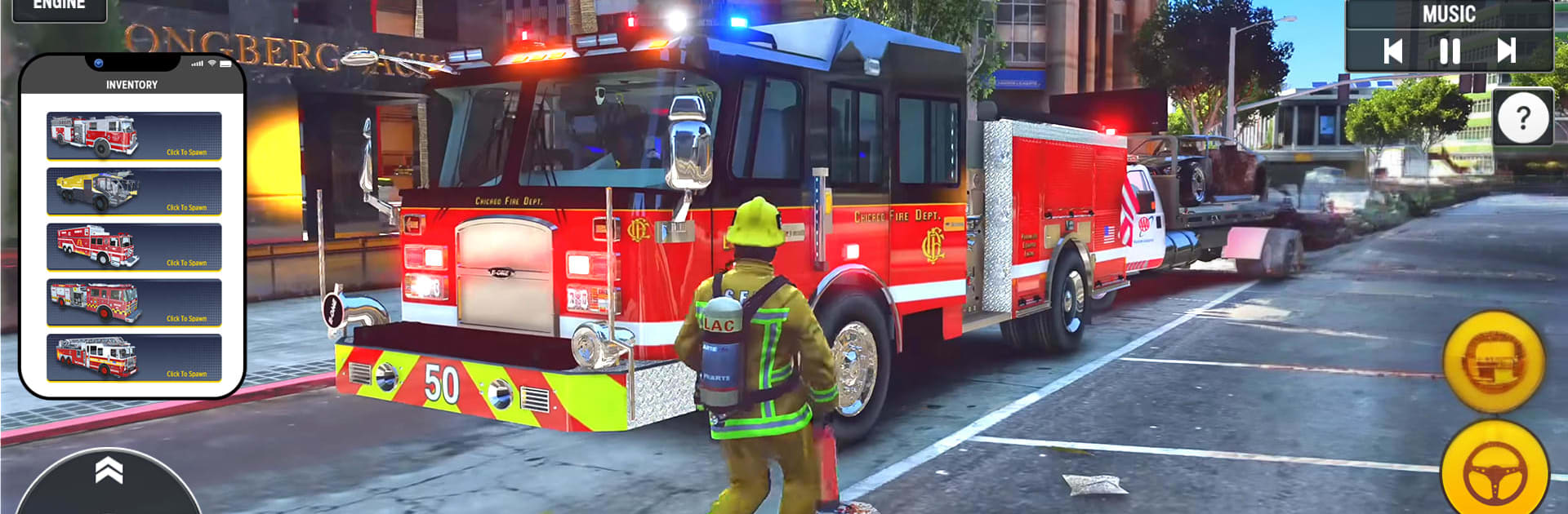
Fire Rescue Truck Simulator 3D

Fire Rescue Truck Simulator 3D

Simulation

| Games Carrier

Play on PC with BlueStacks or from our cloud

  • Overview
  • Game Features
  • How to Play

Page Modified On: November 26, 2026

Play Fire Rescue Truck Simulator 3D on PC or Mac

Bring your A-game to Fire Rescue Truck Simulator 3D, the Simulation game sensation from Games Carrier. Give your gameplay the much-needed boost with precise game controls, high FPS graphics, and top-tier features on your PC or Mac with BlueStacks.

About the Game
Fire Rescue Truck Simulator 3D puts you in the hot seat as both driver and on-scene leader, racing from call to call across a busy city. It’s a Simulation experience where seconds matter—knock down fires, clear crash sites, and coordinate rescues while juggling traffic, timing, and tough decisions. If you like a bigger view and steady keyboard control, it plays smoothly on BlueStacks without changing the core feel.

Game Features
– Big-city emergencies: Tackle major incidents like building fires, messy traffic accidents, and even helicopter crash scenes, each with its own risks and priorities.
– Open-city driving: Navigate an explorable urban map, choose smart routes, and thread through congestion to arrive fast and ready.
– Believable response flow: Size up the scene, set priorities, and carry out step-by-step actions that mirror real emergency procedures.
– Mission variety: Face urgent calls with multi-stage objectives and escalating pressure that test both speed and judgment.
– Career progression: Start as a rookie, sharpen your skills, and move up to larger, more complex operations as your reputation grows.
– Team leadership: Coordinate your crew at the scene, secure areas, and focus on getting civilians out safely.
– Purpose-built trucks: Take command of heavy-duty fire rigs designed for different tasks, from rapid response to large-scale suppression.
– Training that matters: Run drills to master vehicle control and on-scene basics before jumping into the toughest calls.
– Detailed environments: Work across varied districts and city hotspots, keeping each response fresh and demanding in new ways.
– Authentic driving feel: Manage momentum, braking, and positioning in vehicles that reward smooth control under pressure.

Start your journey now. Download the game on BlueStacks, invite your friends, and march on a new adventure.

Game Features

Enhancements

  • Macros
  • Multi Instance
  • Multi Instance Sync
  • Script
  • Enhancements
Macros

Macros

Automate the predictable in Fire Rescue Truck Simulator 3D and transform your gameplay with Macros. Get access to inventive Macros in the BlueStacks Macro Community
Multi Instance

Multi Instance

Play Fire Rescue Truck Simulator 3D on one window. And chat with your friend on the other. Press CTRL + Shift + 8 to open the Multi-Instance Manager. And start creating fresh instances or clone an existing one.
Multi Instance Sync

Multi Instance Sync

Play Fire Rescue Truck Simulator 3D with the power of Multi-Instance Sync. Replicate what you are doing on the main instance on all other instances. Level up faster, play more.
Script

Script

Script your way to gaming glory in Fire Rescue Truck Simulator 3D with BlueStacks Script. Write and run a set of commands to automate repeated tasks. Trigger the command by assigning it to any key.
Read More

How to Download and Play Fire Rescue Truck Simulator 3D on PC or Mac

  • Download and install BlueStacks on your PC or Mac

  • Complete Google sign-in to access the Play Store, or do it later

  • Look for Fire Rescue Truck Simulator 3D in the search bar at the top right corner

  • Click to install Fire Rescue Truck Simulator 3D from the search results

  • Complete Google sign-in (if you skipped step 2) to install Fire Rescue Truck Simulator 3D

  • Click the Fire Rescue Truck Simulator 3D icon on the home screen to start playing

video
Watch Video

Minimum System Requirements

With BlueStacks 5, you can get started on a PC that fulfills the following requirements.

  • Operating System

    Microsoft Windows 7 or above, macOS 11 (Big Sur) or above

  • Processor

    Intel, AMD or Apple Silicon Processor

  • RAM

    at least 4GB

  • HDD

    10GB Free Disk Space

Note:

* You must be an Administrator on your PC. Up to date graphics drivers from Microsoft or the chipset vendor.

Fire Rescue Truck Simulator 3D - FAQs

  • How to play Fire Rescue Truck Simulator 3D on Windows PC & Mac?

    Play Fire Rescue Truck Simulator 3D on your PC or Mac by following these simple steps.

    • Click on 'Play Fire Rescue Truck Simulator 3D on PC’ to download BlueStacks
    • Install it and log-in to Google Play Store
    • Launch and play the game.
  • Why is BlueStacks the fastest and safest platform to play games on PC?

    BlueStacks respects your privacy and is always safe and secure to use. It does not carry any malware, spyware, or any sort of additional software that could harm your PC.

    It is engineered to optimize speed and performance for a seamless gaming experience.

  • What are Fire Rescue Truck Simulator 3D PC requirements?

    Minimum requirement to run Fire Rescue Truck Simulator 3D on your PC

    • OS: Microsoft Windows 7 or above MacOS 11 (Big Sur) or above
    • Processor: Intel, AMD or Apple Silicon Processor
    • RAM: Your PC must have at least 4GB of RAM. (Note that having 4GB or more disk space is not a substitute for RAM)
    • HDD: 10GB Free Disk Space.
    • You must be an Administrator on your PC.
