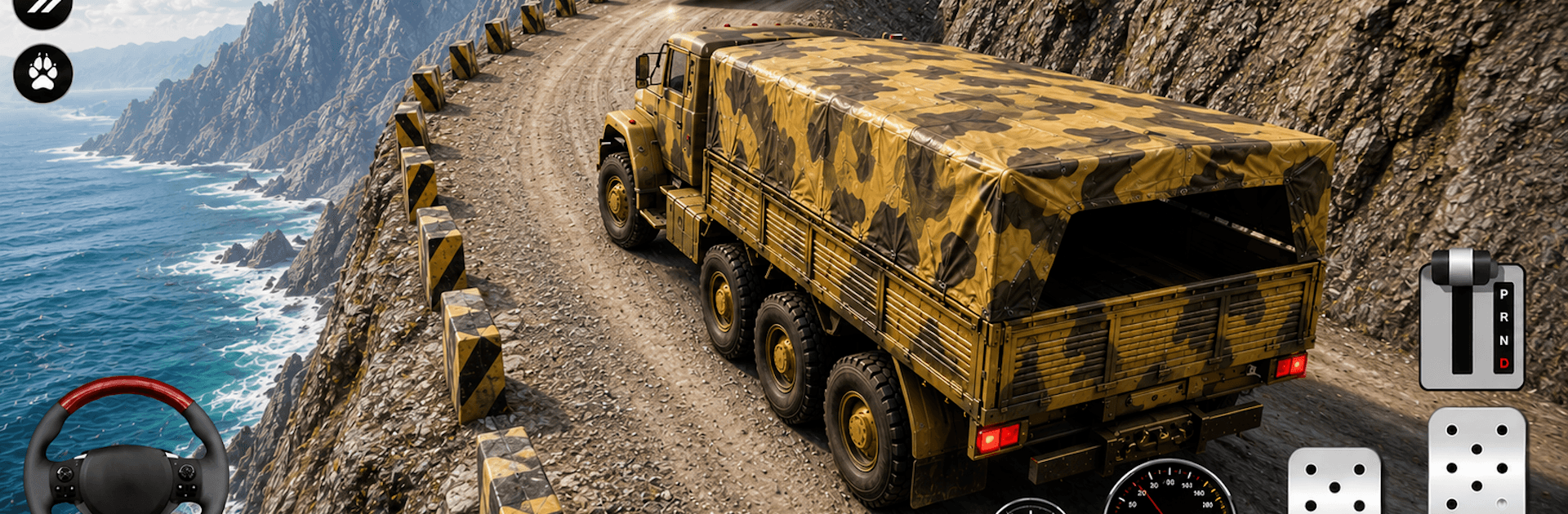
Army Truck Driver: Truck Games

Army Truck Driver: Truck Games

Strategy

| TW Games Studios

Play on PC with BlueStacks or from our cloud

  • Overview
  • Game Features
  • How to Play

Page Modified On: September 18, 2026

Play Army Truck Driver: Truck Games on PC or Mac

Army Truck Driver: Truck Games brings the Strategy genre to life, and throws up exciting challenges for gamers. Developed by TW Games Studios, this Android game is best experienced on BlueStacks, the World’s #1 app player for PC and Mac users.

About the Game

Army Truck Driver: Truck Games is a Strategy take on rugged military transport where every mile and every decision matters. You’re juggling route planning, cargo safety, and tricky terrain while piloting massive army rigs through active zones and tight base checkpoints. Want a wider view and steadier handling? It also plays nicely on PC with BlueStacks.

Game Features

  • Tactical Trucking: Plan safer paths through tense areas, time your moves, and keep sensitive cargo intact under pressure.
  • Authentic Handling: Feel the heft of armored haulers and long trailers with weighty physics that reward smooth steering and measured braking.
  • Military Cargo Runs: Transport tanks, armored jeeps, weapon crates, and supplies between bases using specialized trailers built for the job.
  • Load, Secure, Deliver: Handle ramps, lock down cargo, and complete precise drop-offs before parking in marked zones like a pro.
  • Escort and Security Moments: Tackle convoy-style missions and base-watch scenarios that add a light action flair without overshadowing the driving.
  • Varied Terrain: Master highways, muddy off-road tracks, and restricted military routes filled with sharp turns, steep climbs, and narrow crossings.
  • Progressive Challenge: Start as a rookie, then unlock tougher routes, bulkier trucks, and higher-stakes assignments as your skills grow.
  • Parking That Counts: Thread long trailers into tight spaces and complete training-grade parking checks after each delivery.
  • Immersive Sights and Sounds: Crisp 3D visuals, chunky engine audio, and ambient base chatter build a believable military atmosphere.
  • Play Anytime: Enjoy full single-player missions offline—perfect for quick runs or long hauls whenever you’ve got a minute.
  • Smooth, Flexible Controls: Responsive input and tidy UI let you focus on the road, the mirrors, and the mission—not the menus.

BlueStacks gives you more room to focus on the game and less time adjusting around mobile limitations.

Game Features

Enhancements

  • Macros
  • Multi Instance
  • Multi Instance Sync
  • Eco Mode
  • Enhancements
Macros

Macros

Skip the boring parts of a game. Play Army Truck Driver: Truck Games with Macros and get the edge. Simply record a sequence of commands and execute them at any moment.
Multi Instance

Multi Instance

Why limit to one game on your phone when you can play many on your PC? Open multiple instances of Army Truck Driver: Truck Games at once with Multi-Instance. Leverage the power of different accounts by doing more.
Multi Instance Sync

Multi Instance Sync

Get the best out of Army Truck Driver: Truck Games with Multi-Instance Sync. Play the game from different accounts and build your own empire. Use Multi-instance sync to repeat the action in the main BlueStacks instance on all other instances.
Eco Mode

Eco Mode

Find the rarest heroes by making multiple summons in Army Truck Driver: Truck Games. And while you are at it, reduce your PC’s resource consumption with the Eco Mode. Farm efficiently. Get the best results.
Read More

How to Download and Play Army Truck Driver: Truck Games on PC or Mac

  • Download and install BlueStacks on your PC or Mac

  • Complete Google sign-in to access the Play Store, or do it later

  • Look for Army Truck Driver: Truck Games in the search bar at the top right corner

  • Click to install Army Truck Driver: Truck Games from the search results

  • Complete Google sign-in (if you skipped step 2) to install Army Truck Driver: Truck Games

  • Click the Army Truck Driver: Truck Games icon on the home screen to start playing

video
Watch Video

Minimum System Requirements

With BlueStacks 5, you can get started on a PC that fulfills the following requirements.

  • Operating System

    Microsoft Windows 7 or above, macOS 11 (Big Sur) or above

  • Processor

    Intel, AMD or Apple Silicon Processor

  • RAM

    at least 4GB

  • HDD

    10GB Free Disk Space

Note:

* You must be an Administrator on your PC. Up to date graphics drivers from Microsoft or the chipset vendor.

Army Truck Driver: Truck Games - FAQs

  • How to play Army Truck Driver: Truck Games on Windows PC & Mac?

    Play Army Truck Driver: Truck Games on your PC or Mac by following these simple steps.

    • Click on 'Play Army Truck Driver: Truck Games on PC’ to download BlueStacks
    • Install it and log-in to Google Play Store
    • Launch and play the game.
  • Why is BlueStacks the fastest and safest platform to play games on PC?

    BlueStacks respects your privacy and is always safe and secure to use. It does not carry any malware, spyware, or any sort of additional software that could harm your PC.

    It is engineered to optimize speed and performance for a seamless gaming experience.

  • What are Army Truck Driver: Truck Games PC requirements?

    Minimum requirement to run Army Truck Driver: Truck Games on your PC

    • OS: Microsoft Windows 7 or above MacOS 11 (Big Sur) or above
    • Processor: Intel, AMD or Apple Silicon Processor
    • RAM: Your PC must have at least 4GB of RAM. (Note that having 4GB or more disk space is not a substitute for RAM)
    • HDD: 10GB Free Disk Space.
    • You must be an Administrator on your PC.
